
Built by a practising maths and physics tutor — the first user is still the developer.
One board to rule them all.
Your complete habitat for private tutoring — online whiteboard, lesson diary, scheduling and billing, with AI hints when you want them.

Stop juggling five tools.
Video call in one app, whiteboard in another, notes in a notebook, payments in a spreadsheet, reminders on your phone. TutorHabitat puts it all on one board.
See it in action
Video tour
More of the hour goes to teaching.
- Last week’s board is already in the room. The minutes before a lesson are not a search party.
- Who paid, what is next and what the parent can see: one panel, reminders included. No spreadsheet.
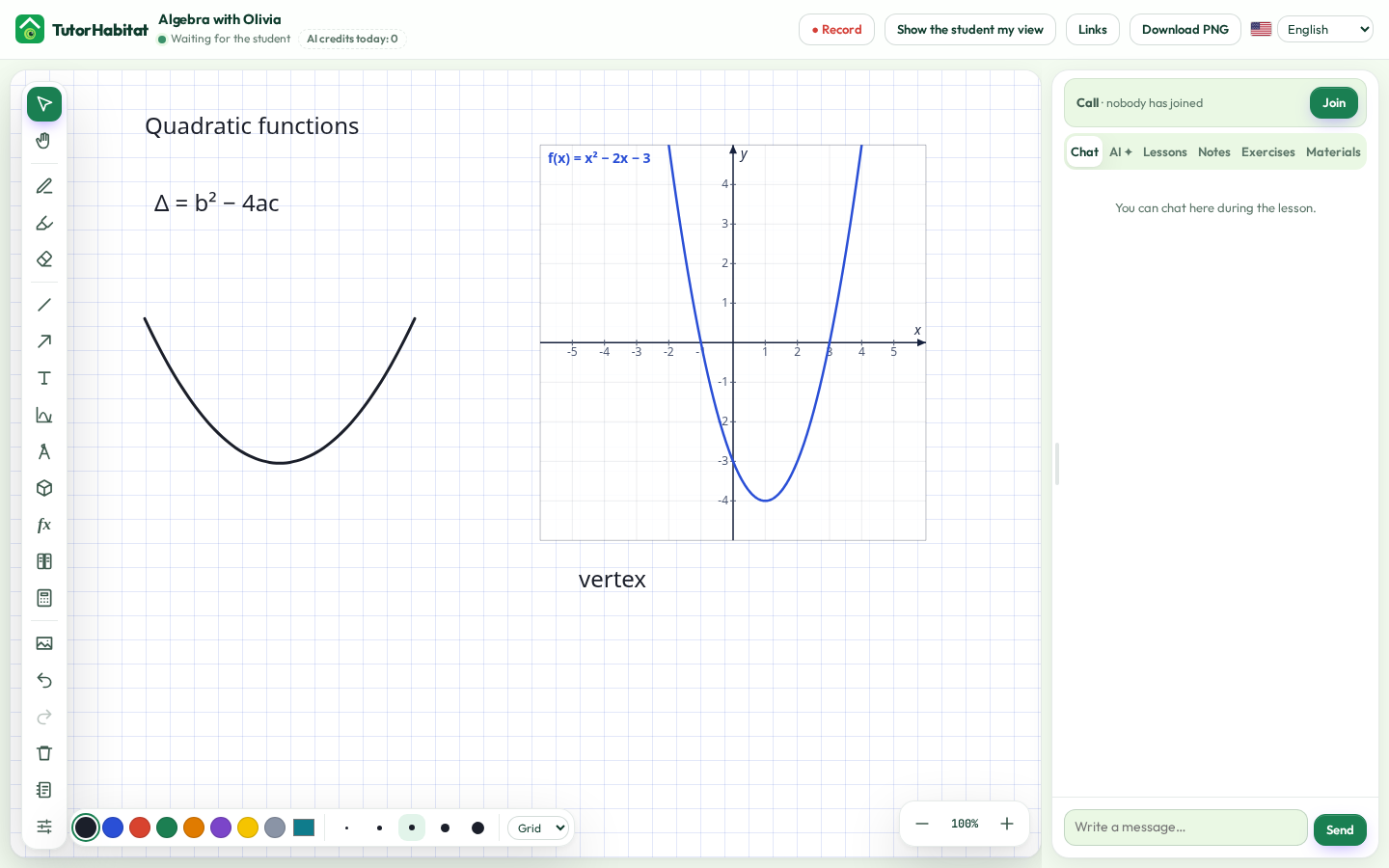
- Graphs, formulas and the calculator sit on the board. You stop rebuilding the lesson from screenshots.
- When you want it, hints come from materials you chose. When you don’t, AI is not in the way.
Features
A board that keeps up with you
Infinite whiteboard with pen pressure, shapes, geometry with compass and ruler, function graphs, 3D solids, molecules, a formula editor and a calculator — choose the toolbox for each room.
Lessons that remember
Each student has a room with the boards from every lesson, chat, notes and homework. Replay any lesson stroke by stroke.
Schedule and billing in one place
Courses, calendar, payers and payments, a page for parents with the balance and upcoming lessons, and e-mail reminders.
AI hints — only when you allow
An AI tutor that guides instead of giving answers, reads handwriting on the board and summarises lessons. Parents consent first.
Made for language teachers too
Character and IPA keyboard, pronunciation read aloud, shared flashcards with spaced review, gap-fill and matching exercises, and a timer for everyone.
Your language, your students’ language
English, Spanish, German, French, Ukrainian, Italian, Portuguese, Polish, Japanese, Korean, Simplified Chinese, Greek, Dutch, Arabic, and Traditional Chinese — everyone picks their own, even in the same room.

AI won’t replace you.
You run the lesson, not the AI. The board, the diary and billing work with AI switched off.
You choose the materials it can see. It stays on your programme and your level — and it hints, it does not give the answer.
Used this way, your student learns when AI helps and when it wanders. That habit is part of what your lesson is worth.
Recording and AI stay off for minors until a parent has consented.
How the private preview works
- Write to us — we create your account.
- Add your students and open a room — they join from a link, nothing to install.
- Teach, and tell us what to improve.
Pricing
During the preview and the beta everything is free. Later: Basic for one teacher and Premium for teams, plus AI credits — or bring your own AI key.
Privacy by design
Servers in the EU. No ads, no tracking cookies, no selling of data. Recording and AI only after parental consent.
FAQ
Do my students need an account?
No — they join a lesson from a link in the browser. Accounts are optional.
Does it work on a tablet?
Yes — in any modern browser, with Apple Pencil and other styluses.
Which subjects?
Any: maths, physics, chemistry, programming, languages — the toolbox adapts to the subject.
Is AI required?
No. The board, the diary and billing work fully without AI.
Who can join the preview?
A small group of tutors we invite. Write to us if you would like to try it.
Do I have to give up my current video call?
No. Open the room in the browser and keep your current call if you prefer. Students join from a link, nothing to install. Moving the call can wait.
Can I upload textbooks?
Upload materials you have the right to use — your notes, your worksheets, files you are allowed to share with that student. The library makes them searchable for you and, if you turn it on, for the hint assistant. Your shelf, not a public book archive.
Want to try it?
Write to us and we will set up your account:
support@tutorhabitat.com